| Version 44 (modified by , 10 years ago) ( diff ) |
|---|
Table of Contents
User guide (git)
This documentation tries to follow the developement version of Py4bot. It may or may not be up-to-date.
For installation instructions, see here.
Usage overview
As Py4bot is a framework, you will find here a description of the main things you need to understand to write your own applications.
Together with this page, have a look at the complete API.
Architecture
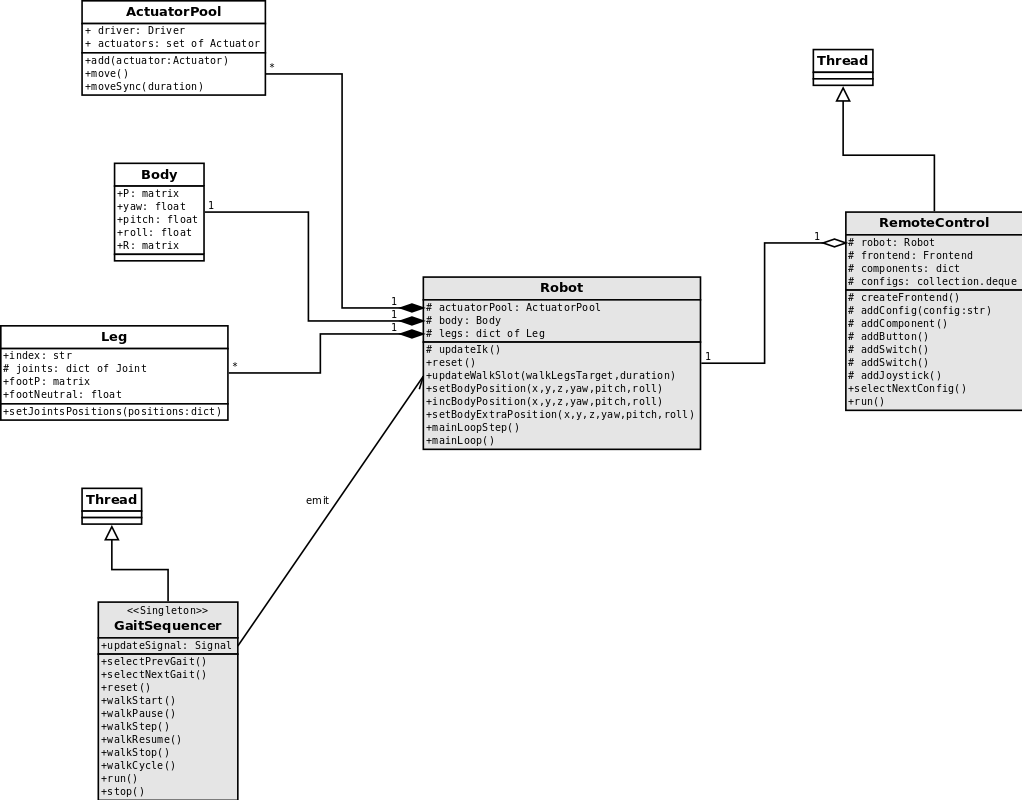
The main parts of the framwork are:
- the robot itself;
- the gait sequencer;
- one or more remote controllers.

Each of these parts runs as separate thread. For now, the robot does nothing in its main loop, ans so, can be used for further devs (automatic stabilization...).
Geometry definition
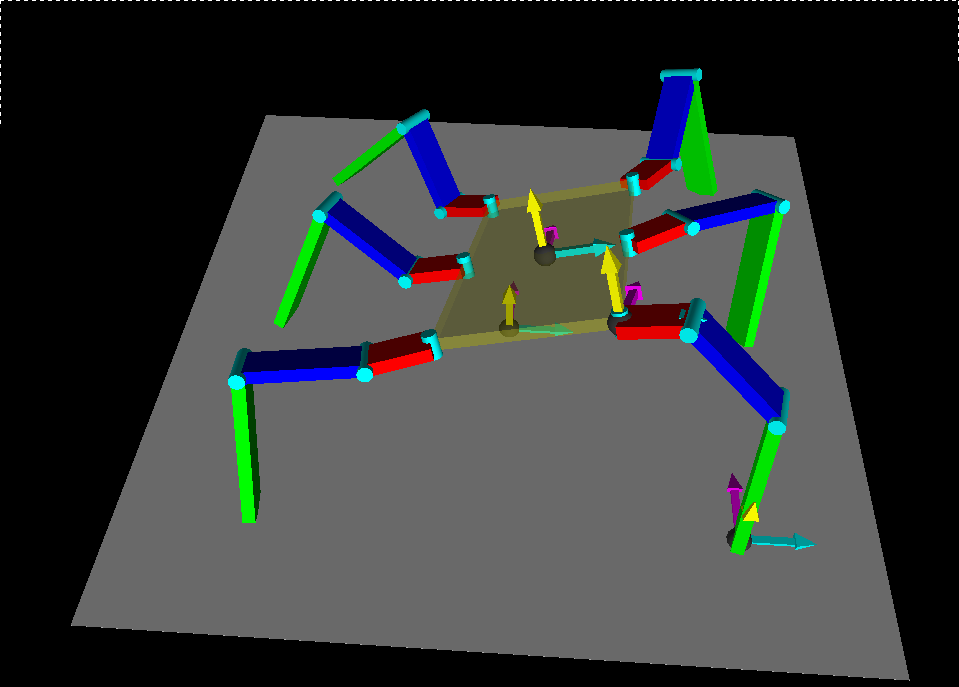
There are several coordinates systems involved when computing maths in order to make a robot walk; it is important to understand how they are defined. All these systems are cartesian.
In the image below, X axis is in cyan, Y axis is in magenta, and Z axis is in yellow:

Robot coordinates system
This coordinates system is attached to the robot itself:
- the origin is at the center of the robot, in the ground plane
- X and Y axes are in the ground plane
- Y axis is the back-to-front axis of the robot
- Z axis points up
Body coordinates system
This coordinates system is attached to the body. It is defined from the body coordinates system:
- the origin is at the center of the body
- X and Y axes define a plane parallel to the body
- Y axis is the back-to-front axis of the body
- Z define the top side of the body
This system is used to define the position of the body in the robot coordinates system, allowing it to move along the 6 DoF (3 translations, 3 rotations).
Legs coordinates systems
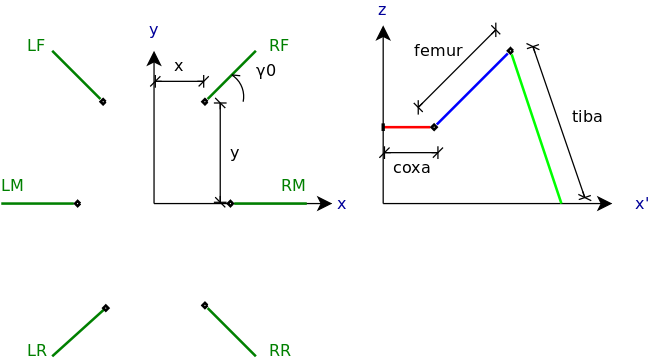
These coordinates systems are attached to the legs, so each leg has its own coordinates system. They are defined from the body coordinates system:
- the origin is at the coxa joint
- X and Y axes define a plane parallele to the body
- X axis is along the coxa of the leg
- Z points up
To summurize, from the body coordinate system, the legs coordinates systems are translated by (x, y) and rotated by gamma0 arround Z:

Todo: improve drawing
Feet coordinates system
They are the last coordinates systems used in this framework, and they are used by the gaits, to make to robot walk.
They are defined from the robot coordinates system:
- the origins are at the center of the feet, in the ground plane
- X and Y axes are in the ground plane
- Y axis is the back-to-front axis of the robot
- Z axis points up
To summurize, from the robot coordinate system, the gaits coordinates systems are translated by (x, y).
Inverse Kinematic
The Inverse kinematic is the the kinematic equations of a robot to determine the joints parameters that provide a desired position of leg (foot).
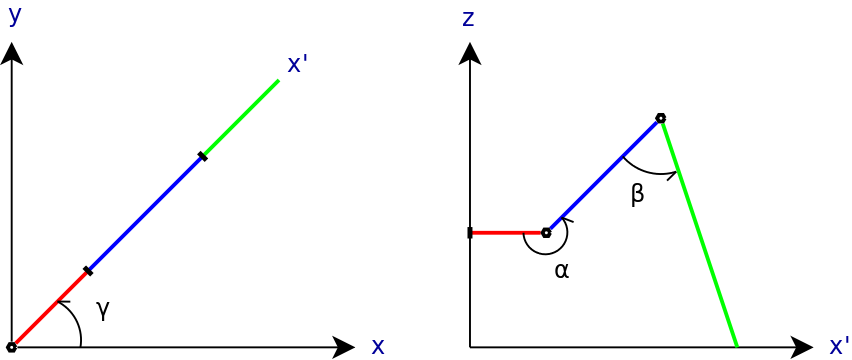
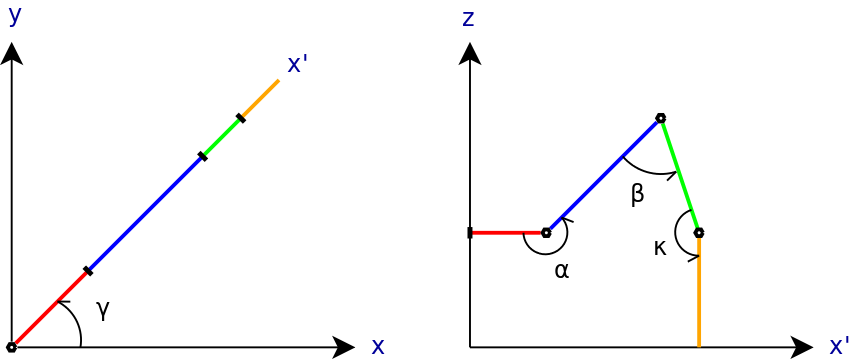
Here are the angles involved:
3 DoF legs
- gamma: angle of the leg in the the body X/Y plane (angle between body X axis and leg X axis)
- alpha: angle of the femur in the leg X/Z plane (angle between coxa and femur)
- beta: angle of the tibia in the leg X/Z plan (angle between femur and tibia)

4 DoF leg
- tars: angle of the tars in the leg X/Z plan (angle between tibia and tars)

Robot
The robot is responsible for all static computation, ie implements the inverse Kinematic. It also manages the body position, which can move along the 3 axes, and rotate arround 3 axes.
As shown in the tutorials, to implement a custom robot, you need to write a new class which inherits from Robot, and overload several methods:
_createBody(self)_createLegs(self)_createActuatorPool(self)
This is where you choose how many legs your robot has, and how many degrees of freedon (Dof) each leg has.
The Robot object has some usefull methods you will have to use in order to make your robot do smart things:
setBodyPosition(self, x=None, y=None, z=None, yaw=None, pitch=None, roll=None)
This method can only be called when the robot is in idle state.
It translates/rotates the body, and the new position is kept.
incBodyPosition(self, dx=0., dy=0., dz=0., dyaw=0., dpitch=0., droll=0.)
This methods can be called in any robot state.
Like the previous method, you can adjust the body position, by little steps.
setBodyExtraPosition(self, x=None, y=None, z=None, yaw=None, pitch=None, roll=None)
This method can only be called when the robot is in idle state.
Like the first method, you can translate/rotate the body. The resulting position of the body is the combination of the bodyPosition and the bodyExtraPosition.
The setBodyPosition() is mainly used at startup, to set a pre-defined position of the body. The setBodyExtraPosition(), however, can be usefull to move the body arround its default position, without loosing it.
- incFeetNeutral(self, dneutral)
This method can only be called when the robot is in idle state.
It allows you to extend/reduce the length of the legs. Each time this method is called, the robot will do a static walk, in order to put all feet to there new neutral position.
Actuators, Pools and Drivers
Actuators are the objects which really move the Joints.
Pools are used to group Actuators, mainly to moved them in a synchronized way. It is possible to have the same Actuator in several Groups, but, of course, you won't be able to drive both Groups at the same time.
A Pool uses a Driver to really make the Actuators move.
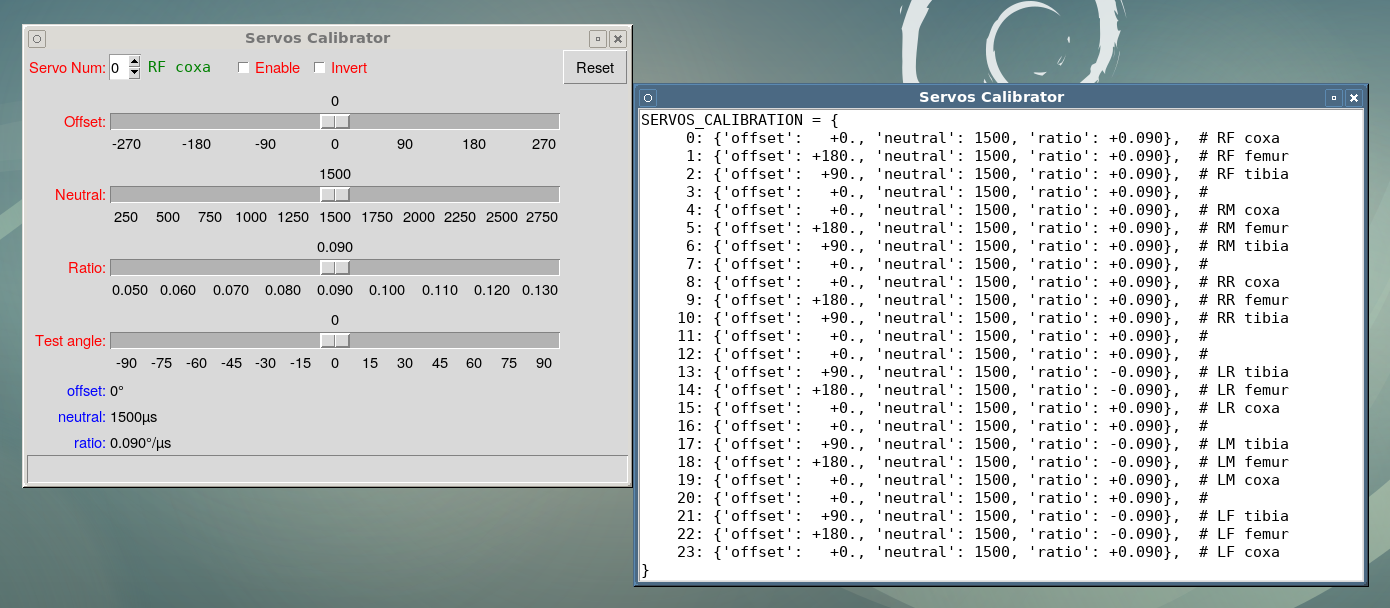
Servos calibration
There are different reasons why you need to calibrate your servos, depending on:
- how you attached your servos to the robot
- what servos your actually use
- how accurate servos are
You can use the py4bot-gui-servocal.py to fine tune your servos calibration, and generate the SERVOS_CALIBRATION dict.

If you launch this tool in the dir. containing your settings.py config file with a previous SERVOS_CALIBRATION dict., it will be used as default values.
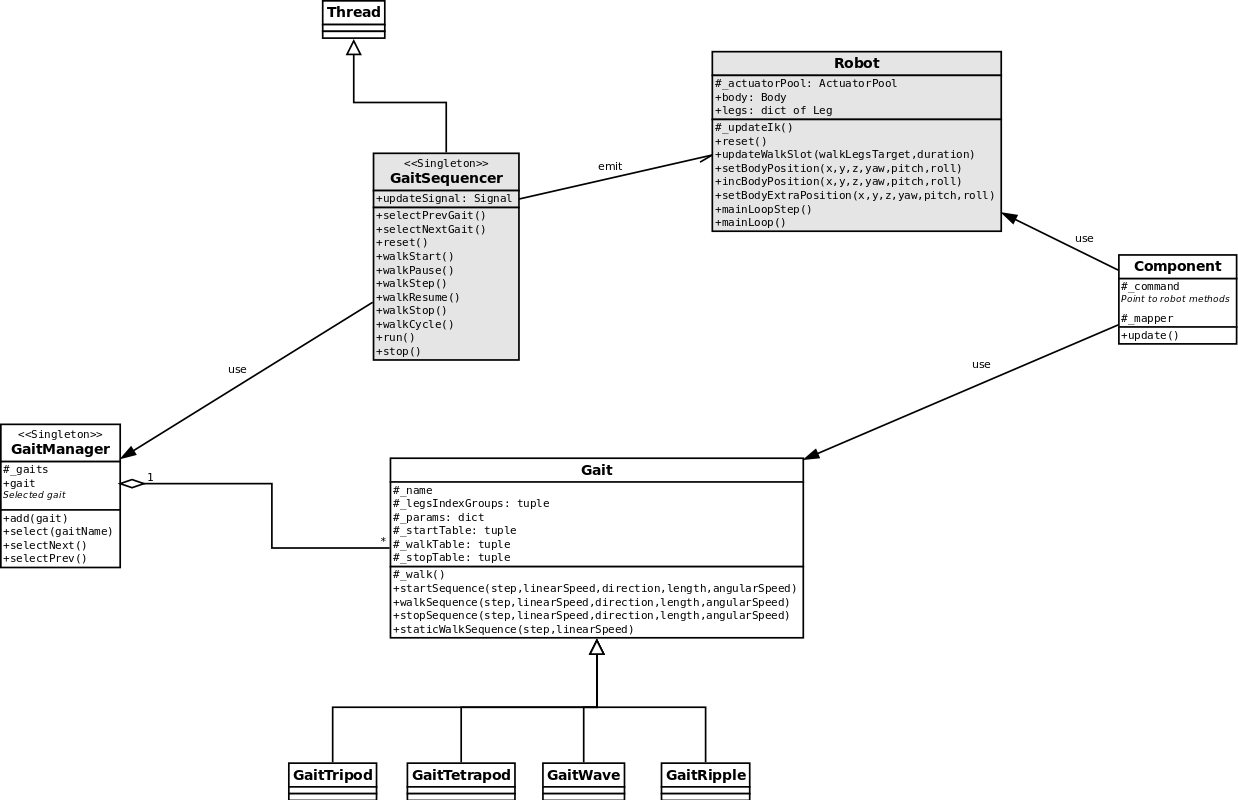
Gaits and gait sequencer
The gaits and gait sequencer implement the dynamic part of the movements, ie the gait itself. It computes the successive feet positions in order to make the robot walk.

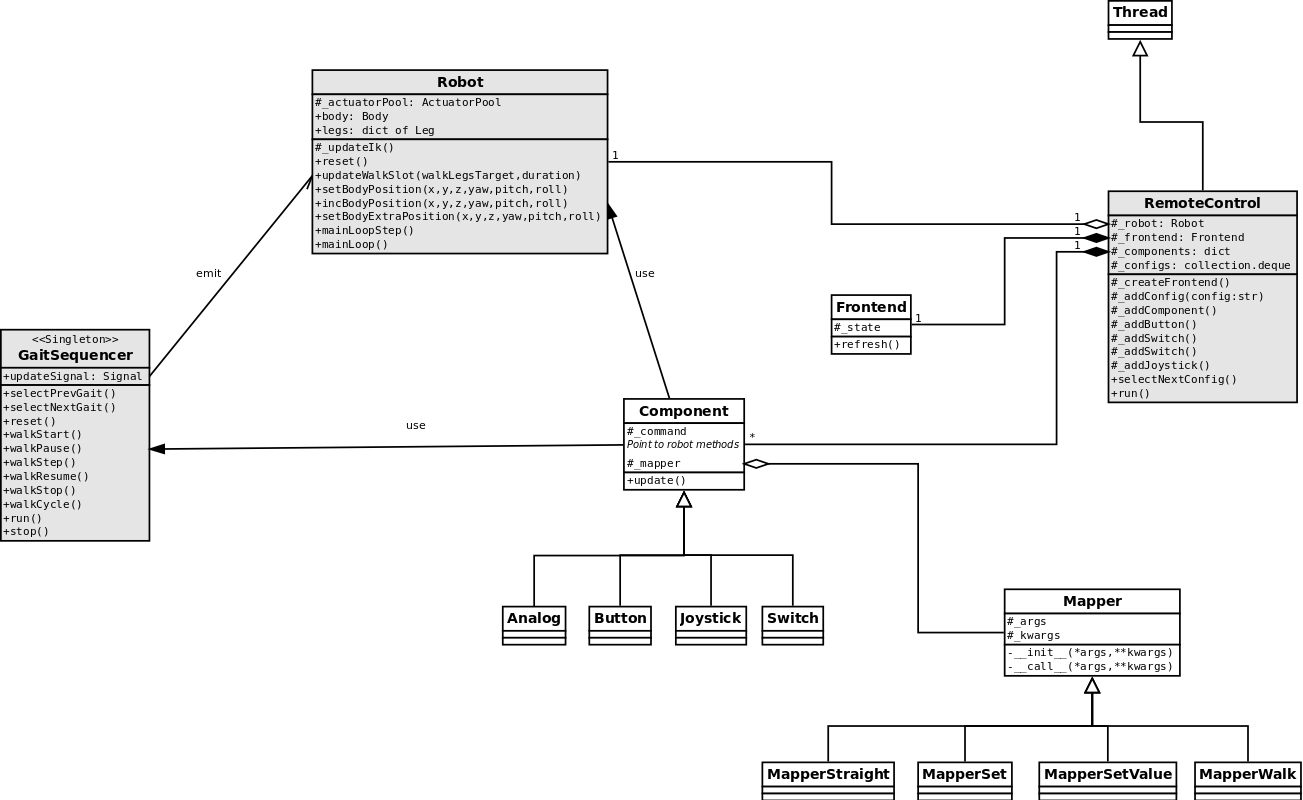
Remote controllers
A remote controller translate user orders to robot/gait sequencer methods calls.

Using mappers
Add a new Frontend
Attachments (8)
-
IK3DoF.png
(13.3 KB
) - added by 10 years ago.
IK 3DoF
-
IK4DoF.png
(14.6 KB
) - added by 10 years ago.
IK 3Do4
-
body_legs.png
(17.0 KB
) - added by 10 years ago.
Body/legs geometry
-
coordinates_systems.png
(22.6 KB
) - added by 10 years ago.
Coordinates systems
-
design_simple.png
(76.7 KB
) - added by 10 years ago.
Design - main parts
- design_remote-control.png (89.0 KB ) - added by 10 years ago.
- design_gait.png (87.3 KB ) - added by 10 years ago.
-
py4bot-gui-servocal.png
(233.0 KB
) - added by 9 years ago.
Screenshot of servos calibrator tool
Download all attachments as: .zip